Thirteen channels.
One connected customer journey.
Bring messaging, social, email, website chat and voice into one workspace. Your team sees the full customer history, responds from a single queue and delivers consistent service on every channel.
WhatsApp Business
Turn your WhatsApp Business number into a managed sales and service channel, with official Meta connectivity, guided onboarding and template management inside Teloring.
- Official Business API
- Template messages
- Buttons & interactive lists
- Images, video, documents
Transform every mailbox into a collaborative service channel. Connect Microsoft 365, Gmail, IMAP/SMTP or a Teloring-managed address and manage every thread from the shared workspace.
- Microsoft 365 & Gmail sign-in
- Any IMAP/SMTP mailbox
- HTML rendering & threading
- Attachments & inline images
Voice
Manage calls from an in-browser phone and keep every interaction on the same customer record as chat, email and social conversations, including call recordings.
- Inbound, outbound & internal calls
- Browser softphone — mute, hold, hang up
- Call recording & auto-resolve
- Call flows built in Studio
Website chat
Convert website visits into sales and service conversations with a branded chat experience that connects visitors directly to your team.
- One embed snippet
- Customisable appearance
- File sharing
- Mobile responsive
SMS
Reach customers instantly with two-way text messaging from a business number—ideal for updates, confirmations and time-sensitive service conversations.
- Two-way messaging
- Delivery receipts
- Multi-provider
- Studio-driven sends
Instagram Messenger
Manage Instagram direct messages and story replies from the same workspace, with customer context available before every response.
- Direct messages
- Story replies
- Images, video & media
- Official Meta API
Instagram Pages
Turn comments on Instagram posts into structured conversations, route them to the right team and continue the relationship without losing context.
- Post comments
- Public replies
- Conversation routing
- Official Meta API
Facebook Messenger
Bring private messages from your Facebook Page into the shared workspace, so sales and support teams can respond quickly with the complete customer history.
- Private Page messages
- Customer history
- Quick replies & rich cards
- Official Meta API
Facebook Pages
Manage comments and activity on Facebook Page posts as service conversations, with clear ownership, routing and follow-up from the same queue.
- Post comments
- Public replies
- Assignment & routing
- Official Meta API
Telegram
Connect a Telegram bot and manage personal or group conversations with rich media and interactive responses from the Teloring workspace.
- Bot API
- Inline keyboards
- Rich media
- Group chats
LINE
Serve customers through a LINE Official Account from the same workspace—ideal for brands operating in markets where LINE is a primary communication channel.
- Messaging API
- Rich menus
- Flex messages
- Regional reach
TikTok Messenger
Turn TikTok direct messages into managed sales and service conversations, routed to the right team alongside every other customer channel.
- TikTok direct messages
- OAuth connection
- Media support
- Business API
API channel
Connect proprietary apps, legacy systems or IoT devices through a flexible developer channel and manage their messages as native Teloring conversations.
- REST endpoint per inbox
- Contact find-or-create
- Webhook events out
- Sample code included
See your entire communication ecosystem at a glance
My Ring gives administrators a clear visual map of every available channel and connected inbox. See what is active, identify what is still available and add new customer touchpoints from one central place.
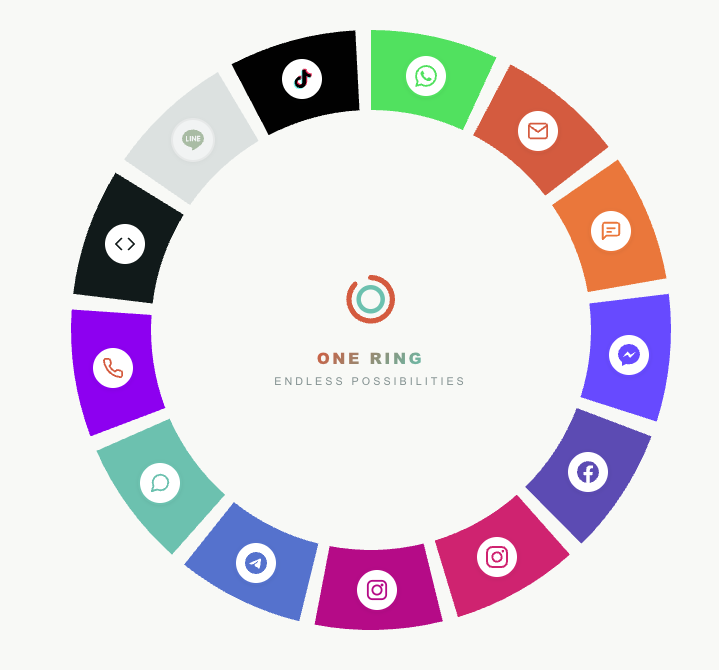
Every team gets the right inbox
Connect multiple numbers, mailboxes or widgets for the same channel type and organise them by brand, department, region or use case. Each inbox keeps its own identity and settings while contributing to one customer view.
- Several inboxes per channel type, each named by you
- Filter and report by channel type or inbox name
- Deleting an inbox stops new messages but keeps every conversation
- Admins manage the inboxes; reps just use them
Connect each channel with confidence
A clear setup flow guides administrators from provider authentication to a verified test conversation, with dedicated documentation for every channel.
Choose a channel
Open My Ring and select the channel you want to add. The visual map immediately shows which channel types are already connected.
Connect and configure
Name the inbox and complete the relevant provider step, such as Meta or Microsoft authentication, number verification, a bot token or an embed code.
Verify before launch
Send a test message, confirm that it reaches the shared queue and launch the channel for your team with confidence.
Meet customers wherever they choose to connect
Start free, connect your first channels and give your team one complete view of every conversation.